
Policy exceptions
An exception is a reviewed, temporary acceptance of one eligible finding on one saved Terraform plan. It is not a way to turn off mandatory controls.
- Typical time
- 10–25 minutes plus reviewer time
- You need
- A saved governance review with an eligible finding and a different authorized reviewer
- Outcome
- A bounded, audited exception decision tied to exact evidence
Step 1: Open exceptions for a saved plan
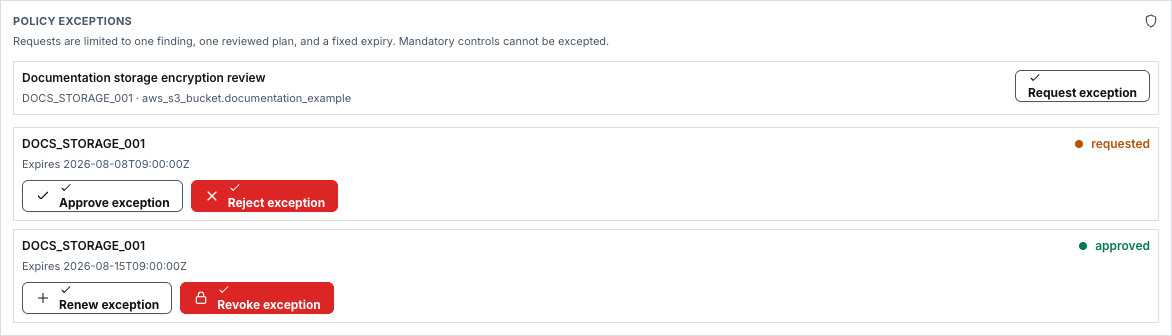
Section titled “Step 1: Open exceptions for a saved plan”Open one Terraform run and its saved governance review. Find Policy exceptions. Only eligible findings offer Request exception; mandatory controls cannot be excepted.
Confirm the finding, plan run, workspace, and revision before continuing. Changing the plan makes earlier evidence stale.
Step 2: Submit a bounded request
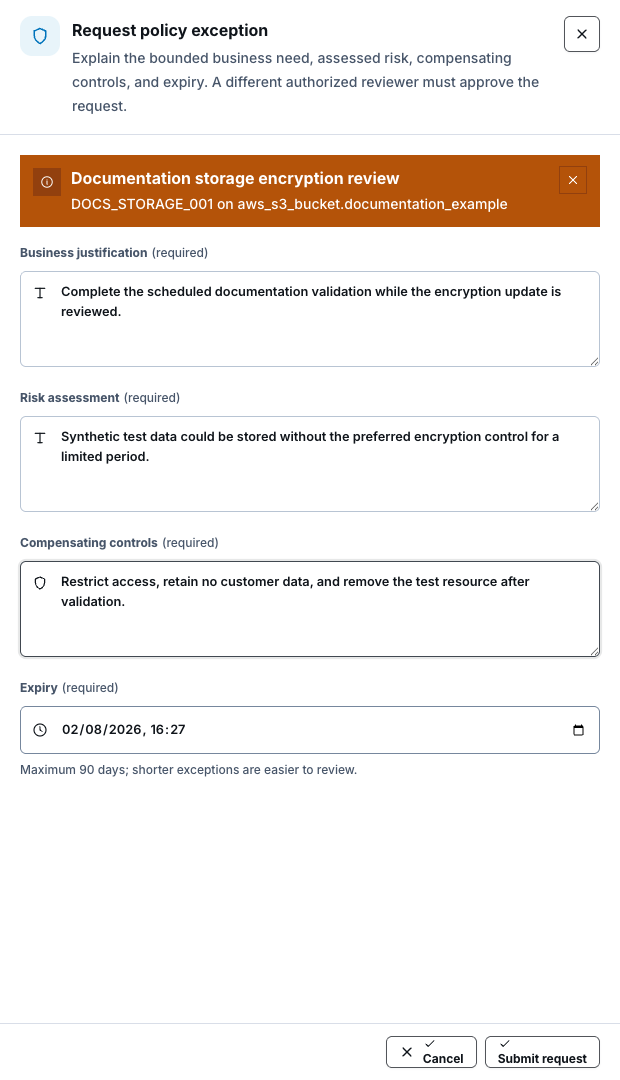
Section titled “Step 2: Submit a bounded request”Select Request exception and complete:
- Business justification — why the work cannot wait for remediation;
- Risk assessment — the credible impact and exposure;
- Compensating controls — how risk is reduced during the exception;
- Expiry — the shortest useful period, never more than 90 days.
Submit the request. It remains bound to one finding and the reviewed plan. Never include credentials, tokens, secrets, raw plan data, or sensitive customer content in these fields.
Step 3: Approve or reject as a separate reviewer
Section titled “Step 3: Approve or reject as a separate reviewer”A different authorized reviewer inspects the exact finding, plan linkage, justification, risk, controls, and expiry. Select Approve exception only when the bounded risk is acceptable, or Reject exception when remediation or stronger evidence is required.
The requester cannot approve their own request. Approval of an exception does not approve the Terraform apply.
Step 4: Renew before more time is needed
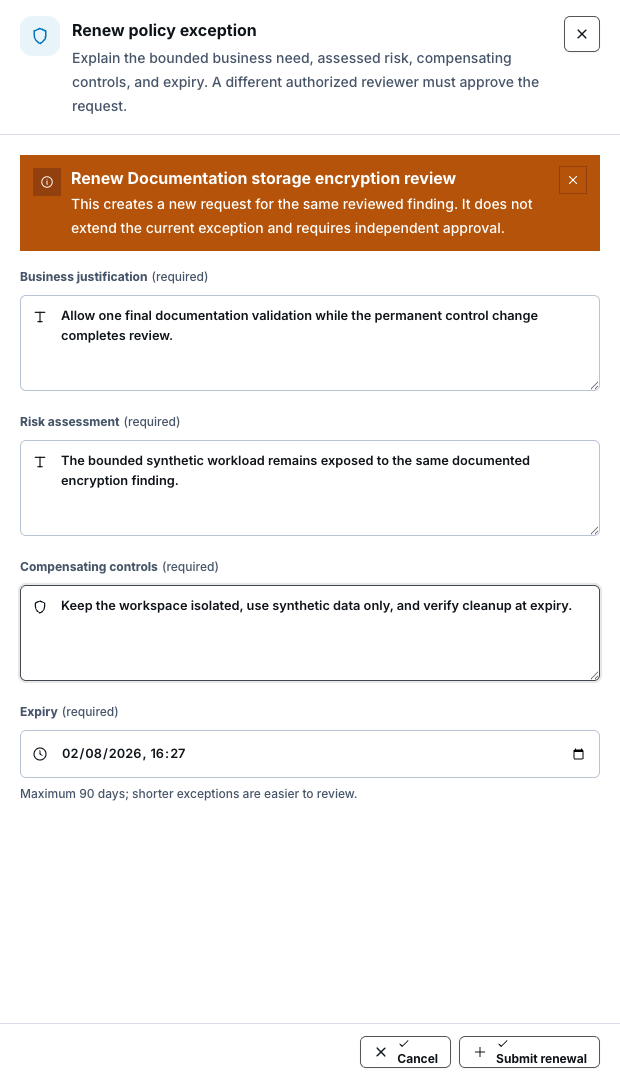
Section titled “Step 4: Renew before more time is needed”For an approved exception, select Renew exception. Review and resubmit the justification, risk, compensating controls, and a new bounded expiry.
Renewal creates a new request with independent review. It does not extend or rewrite the approved record, and the requester still cannot self-approve.
Step 5: Revoke an exception
Section titled “Step 5: Revoke an exception”When the risk is no longer accepted or remediation is complete, select Revoke exception. Review the finding and expiry before taking this destructive action. Revocation stops future reliance on that exception; it does not erase its audit history.
Step 6: Confirm expiry and plan linkage
Section titled “Step 6: Confirm expiry and plan linkage”Expired exceptions are closed by a bounded scheduled process and remain auditable. Before relying on an approved exception, confirm that it is active and still matches the exact finding, workspace, plan run, and revision.
Create a fresh plan after any Terraform or policy-evidence change. A stale exception must not authorize a different run.
Check your result
Section titled “Check your result”The request has a clear state, fixed expiry, separate decision-maker, and linkage to the exact approved plan and revision. Renewal or revocation appears as a new audited action rather than rewritten history.
Common blockers
Section titled “Common blockers”- Request exception missing: the finding may be mandatory, ineligible, or not part of a saved review.
- Approve unavailable: the requester cannot decide their own request, or the reviewer lacks permission.
- Evidence changed: create a fresh plan and submit a new request.
- Expired: expired approval cannot be reused; start a reviewed renewal or remediate the finding.
Deployment wiring alone does not prove live expiry processing or runtime enforcement. Record that proof only after an authorized environment check.