
Approvals and apply
Approval belongs to one plan, revision, workspace, provider connection, policy contract, and cost-evidence set. It is not a reusable permission.
- Typical time
- 10 minutes to review window
- You need
- A successful reviewed plan
- Outcome
- An approved or explicitly blocked plan
Step 1: Evaluate guardrails
Section titled “Step 1: Evaluate guardrails”Choose Run guardrails review. Review:
- review status and risk score;
- organization baseline, project rules, and workspace context;
- policy findings and scanner evidence;
- cost policy status and required acknowledgements;
- approval gates and minimum approvals;
- reviewer availability; and
- review and plan expiry.

Step 2: Resolve findings and acknowledgements
Section titled “Step 2: Resolve findings and acknowledgements”Fix blocking findings in source when practical and run a new plan. Where the product requires acknowledgement, review the finding or cost evidence and add a safe comment.
An acknowledgement records review; it does not convert a blocking rule into a pass unless the authoritative governance evaluation permits that path.

Step 3: Collect independent approval
Section titled “Step 3: Collect independent approval”Share the Review link with an eligible reviewer who already has project access. Reviewers can approve, reject, or comment through the current review.
The requester cannot approve their own governed request. Required reviewer groups and the organization approval floor must remain satisfiable.

Step 4: Confirm APPROVED is still current
Section titled “Step 4: Confirm APPROVED is still current”Before apply, refresh the review and confirm:
- status is APPROVED;
- plan and review have not expired;
- policy alignment is not STALE;
- approval gates remain satisfied;
- exceptions remain approved and unexpired;
- cost evidence and acknowledgements still match; and
- provider connection and environment are unchanged.
Any changed evidence requires a fresh plan review.

Step 5: Apply the approved plan
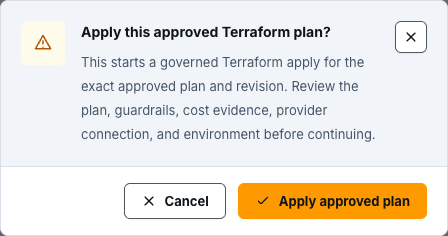
Section titled “Step 5: Apply the approved plan”Choose Apply approved plan from the successful plan. Read the confirmation: the apply uses the exact approved plan and revision. Confirm only after rechecking guardrails, cost evidence, provider connection, and environment.
ScrinCloud creates a separate apply run linked to the approved plan. Monitor it to a terminal state and review resource-level execution evidence.
Emergency break-glass
Section titled “Emergency break-glass”Emergency break-glass apply is not a shortcut for normal delivery. When the review makes it available:
- provide the incident reason and selected one-time scopes;
- record safe risk acceptance and rollback/monitoring context;
- complete required strong verification;
- obtain an independent Approve Break-Glass decision;
- use the one-time override before it expires or is revoked; and
- complete the required post-event review with outcome, notes, and follow-up actions.
Never place secrets, incident-sensitive payloads, or raw infrastructure data in break-glass comments.
Check your result
Section titled “Check your result”Approval is complete only when the current review says APPROVED and every required gate, cost acknowledgement, policy exception, reviewer floor, and evidence binding is satisfied. Delivery is complete only after the linked apply run is separately verified.
Common blockers
Section titled “Common blockers”Review is STALE or EXPIRED
Section titled “Review is STALE or EXPIRED”Run a new plan and guardrails review. Do not attempt to revive the old approval.
Self-approval is rejected
Section titled “Self-approval is rejected”Use a different eligible reviewer. This is an intentional separation-of-duties boundary.
Approval floor cannot be satisfied
Section titled “Approval floor cannot be satisfied”Correct reviewer-group membership and minimum approvals. Do not lower the organization floor to unblock one plan.
Break-glass unavailable
Section titled “Break-glass unavailable”The environment, policy, permissions, or review does not permit the emergency path. Continue through normal remediation and approval.